

.png)
Data management
made effortless
Enjoy the freedom to do more with Maia on your side.

.png)
Hundreds of articles about AI and data engineering are published every day across blogs, Reddit, arXiv and vendor sites. A handful of them matter to your team. Finding that handful usually means someone skimming feeds for an hour, or a keyword filter that can't tell an article about data pipelines from one that mentions them in passing.
This post shows how to build a feed that does the reading for you. Every day it:
We built it in Maia as six low-code pipelines running on Snowflake, and used Jev to score the articles. Scoring 404 full-text articles cost $0.026. Along the way we captured the method as two Maia skills, so you can build the same kind of feed for your own topics, or reuse the scoring pattern for any text you need to classify.
If you're new to any of these, here's what each one does in this project:
Maia pipelines come in two types. Orchestration pipelines control the flow: they run steps in order, loop over rows, call APIs and send messages. Transformation pipelines work on the data itself: they filter, join and calculate, and Maia turns them into SQL that runs in Snowflake.

The project has six pipelines, one for each stage:
The build takes eight steps. Each one covers one stage of the pipeline, with the settings and gotchas we hit along the way.
Code that runs inside Snowflake can't reach the internet by default. To fetch feeds, you create a network rule that lists the hosts you want to call, wrap it in an External Access Integration, and grant that integration to the role your pipelines run as.

CREATE NETWORK RULE GENAI_NEWS_NETWORK_RULE
  MODE = EGRESS TYPE = HOST_PORT
  VALUE_LIST = ('techcrunch.com', 'www.reddit.com', 'rss.arxiv.org', 'arxiv.org',
                'feed.infoq.com', 'www.infoq.com', 'huggingface.co', ...);

CREATE EXTERNAL ACCESS INTEGRATION GENAI_NEWS_ACCESS
  ALLOWED_NETWORK_RULES = (GENAI_NEWS_NETWORK_RULE) ENABLED = TRUE;

GRANT USAGE ON INTEGRATION GENAI_NEWS_ACCESS TO ROLE <pipeline_role>;
You don't need ACCOUNTADMIN for this. SYSADMIN can create the integration. Note - its security best practice to have this as a manual step rather than giving Maia a role with ACCOUNTADMIN privileges.
Tip: list both the feed host and the article host. Many sites publish their feed on one host and their articles on another, for example feed.infoq.com and www.infoq.com. If you allow only the feed host, you'll get headlines but no article text.
Tip: updating the rule replaces the whole list. ALTER NETWORK RULE ... SET VALUE_LIST doesn't append. Include every existing host when you add a new one, or keep the full list in a setup script and rerun it.
Tip: a source with zero articles usually means a missing host. Have your ingest step log how many articles it got from each source. When a source shows 0, check the network rule first.
One Python Pushdown component does all the collecting. Python Pushdown runs a Python script inside Snowflake, so you get the flexibility of code without managing anywhere to run it. In the component, select the GENAI_NEWS_ACCESS integration, Python 3.11 and the requests package, and set a timeout of 600 seconds.
The script keeps a dictionary of sources, each with one or more candidate feed URLs, and uses the first one that returns items. A simplified version looks like this:
SOURCES = {
    "infoq":             ["https://feed.infoq.com/"],
    "arxiv cs.CL":       ["https://rss.arxiv.org/rss/cs.CL"],
    "r/dataengineering": ["https://www.reddit.com/r/dataengineering/hot.json"],
    # ... 20 more sources
}

articles, counts = [], {}
for name, urls in SOURCES.items():
    for url in urls:
        items = fetch_and_parse(url)        # RSS 2.0, Atom or Reddit JSON
        if items:
            break
    for item in items:
        if len(item["body"]) < 500:         # feed gave only a summary
            item["full_text"] = fetch_article_text(item["url"])
    articles += items
    counts[name] = len(items)

print("Articles per source:", counts)
The script then removes duplicate URLs, writes the batch to a staging table and runs a MERGE into GENAI_NEWS_RAW on the URL. Because of the merge, you can rerun the ingest as often as you like without creating duplicates.
Tip: cap high-volume sources. arXiv alone can add more than 100 papers a day. A keyword filter and a cap of 15 per category keep it from crowding out everything else.
Tip: some sites need a User-Agent header. Reddit's JSON endpoints reject requests without one. Set a descriptive User-Agent on every request.
Tip: not every source has article text. Hacker News gives you a title and a link but no body, so there's nothing for Jev to score. The Prepare Reviewable Articles step filters out items with blank or very short text, which also stops you paying for empty calls.
Jev scores text against questions you write in plain English, so this is where you define what "relevant" means. We used two topics:
"data_engineering": {"type": "noul",
  "instructions": "The article is primarily about data engineering: pipelines, ETL/ELT,
   warehouses, ... Articles mainly about model training, GPUs or benchmarks do not qualify."},

"maia_evaluation": {"type": "noul",
  "instructions": "The article describes a technique, benchmark or method that could help
   evaluate an agentic AI assistant that builds data pipelines ..."}
The noul type asks Jev for a score from 0 to 1. Start each question with what the text is primarily about, list what qualifies, and then say what doesn't.
Tip: use exclusion clauses for the near misses. "Articles mainly about model training, GPUs or benchmarks do not qualify" cut most of the false positives for the data engineering topic. Exclusions also push scores toward 0 or 1, so recheck your thresholds whenever you change the wording.
The Classify News with Jev orchestration does the scoring. It prepares the articles, creates an empty results table, calls Jev once per article, and then runs the transformation that filters the results.

Two components do the work in "Call Jev":
The iterator's query prepares each article's text so that it can sit safely inside a JSON string:
SELECT "ARTICLE_ID",
       REPLACE(REGEXP_REPLACE(REPLACE('Title: ' || "title" || ' Article: ' || "full_text",
               '\\', ' '), '\\s+', ' '), '"', '\\"') AS STATE_TEXT
FROM GENAI_NEWS_REVIEWABLE
The connector then sends this body for each article. It contains the text, the model version, your topic questions and one extra key:
{"state": "${iter_state_text}", "model": "jev-1.13.0", "questions": {
  "data_engineering": {"type": "noul", "instructions": "..."},
  "maia_evaluation":  {"type": "noul", "instructions": "..."},
  "ref_${iter_id}":   {"type": "noul", "instructions": "x"}}}
Tip: get your ID back with a dummy question. Jev's response doesn't include anything that identifies which row it belongs to, which is a problem when four calls run at once. Adding a question named ref_<article_id> fixes it: the ID comes back as one of the answer keys, so every response can be joined to its article.
Tip: escape the text before it goes into the body. Quotes, backslashes and line breaks in an article will break the JSON. The query above removes backslashes, collapses all whitespace to single spaces and escapes double quotes. Use '\\"' as written; escaping it twice makes the call fail.
Tip: keep it on one line and under the size limit. Keep the whole request body on a single line, because line breaks inside variables break the request. Keep the text plus the longest question under 32,000 tokens, and truncate very long articles upstream.
Tip: you can ignore one validation warning. The iterator's target component may show "Context creation failed" during validation. It still runs correctly.
The Filter News Stories transformation reads the raw JSON responses and turns them into one table per topic, without any hand-written SQL. A Calculator component adds new columns from expressions. Ours pulls the article ID and each topic's score out of the JSON:
-- article ID, recovered from the ref_<id> answer key
REGEXP_SUBSTR(ARRAY_TO_STRING(OBJECT_KEYS("DATA_VALUE":answers), ','),
              'ref_([0-9a-f]{32})', 1, 1, 'e', 1)

-- score for one topic
"DATA_VALUE":answers:data_engineering:noul::FLOAT
A Join attaches the scores to the articles. A Filter for each topic keeps the articles at or above that topic's threshold, and a Rewrite Table saves the result. We used 0.65 for data engineering and 0.5 for Maia evaluation, both stored as pipeline variables so they're easy to change.

Tip: save every score, not just the winners. The all-scores table is what you tune with. Read the titles that scored between 0.4 and 0.8, decide which ones you wanted, and move the threshold to match.
The Build News Digest transformation turns the topic tables into one ready-to-send message per topic, using only low-code components:

A Unite combines the topic tables. A Calculator ranks the stories within each topic, and a Filter keeps the top N. A second Calculator joins the formatted lines into a single message, and an Aggregate leaves one row per topic:
ROW_NUMBER() OVER (PARTITION BY topic ORDER BY score DESC)                          -- rank

LISTAGG(line, '\n') WITHIN GROUP (ORDER BY rank) OVER (PARTITION BY topic)   -- digest text
Pipeline variables control the length: email_top_n (15), slack_top_n (5), snippet_chars (250) and slack_snippet_chars (160).
Tip: use a constant delimiter in LISTAGG. Write the delimiter as '\n'. An expression such as CHR(10) isn't accepted there.
Tip: tidy URLs and names before they reach Slack. Strip utm_* tracking parameters from links, and replace underscores in source names with spaces, because Slack reads underscores as italic markers.
The Send News Digest orchestration uses a Query to Grid component to load one row per topic into a grid variable. Two Grid Iterators then loop over that grid: one sends each digest by email with an SNS Message (Amazon SNS), and the other posts it to Slack with a Webhook Post to a Slack workflow. A topic_filter variable (default %) lets you test one topic at a time.

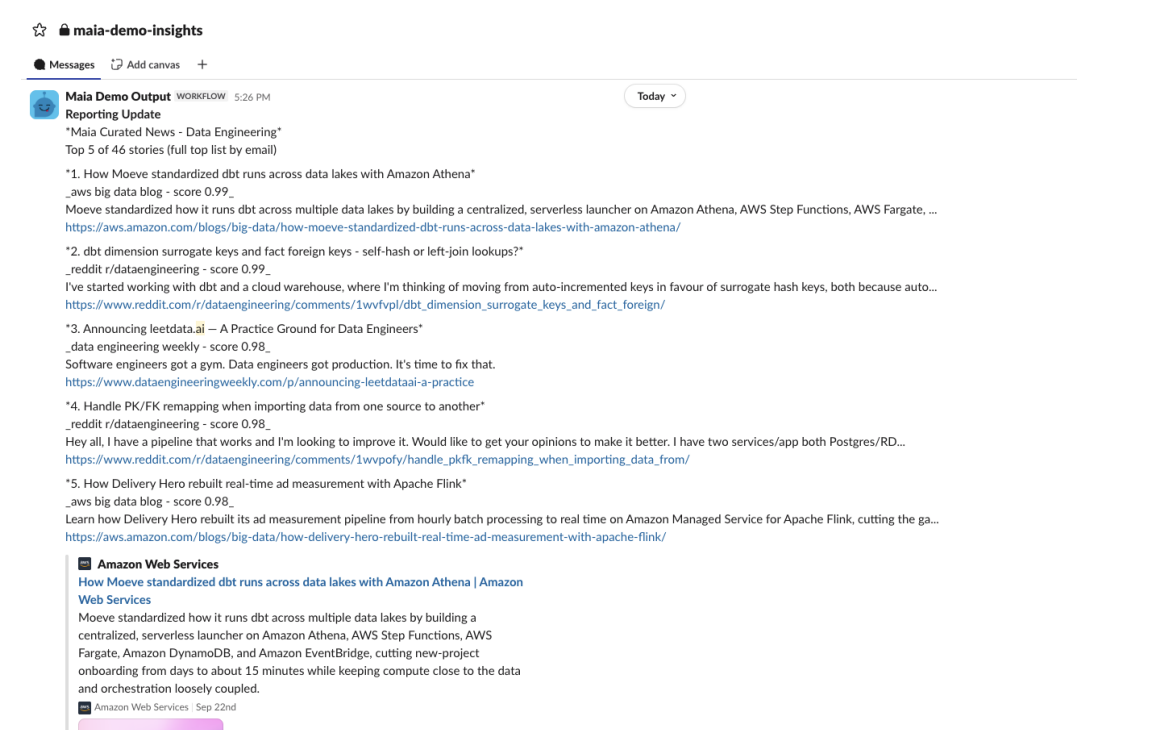
Tip: keep messages short, because neither channel tells you when it drops one. Both SNS and Slack workflow webhooks report success even when nothing arrives. A 47,000-character email was silently dropped, while the top 15 stories (about 7,000 characters) arrived every time. Slack workflow webhooks drop messages over about 4,000 characters, which is why Slack gets the top 5.
Tip: format links for Slack workflows. Workflow messages don't render <url|title> links. Put the title on one line and the bare URL on the next.
Tip: test link previews in a clean channel. Slack previews only about five links per message, and won't preview a link that was posted in the same channel recently.
Commit and publish the pipelines, then schedule Ingest, Classify and Send to run daily in that order, or wrap them in one orchestration and schedule that.
From 404 articles with usable text:

The scores also tell you which sources are worth keeping. Specialist sources such as r/dataengineering, Data Engineering Weekly, the AWS Big Data Blog and arXiv had most of their articles kept. Broad AI news sites had very few kept, and MIT Technology Review, The Verge and Wired contributed nothing to either topic, so they're the first candidates to drop.
The batch was 404 articles and 625,939 input tokens, about 1,550 tokens per article including the questions. Jev returns only scores, so for comparison we assumed an LLM would need about 30 output tokens per article.
Claude figures use on-demand list prices and exclude prompt caching and batch discounts, which would narrow the gap.
Jev was about 25x cheaper than Haiku and 80x cheaper than Sonnet for this job. It also returns a number rather than text, so there's nothing to parse, and thresholds can be tuned directly. Adding a topic costs almost nothing, because you pay for the article's tokens once however many questions you ask.
A Maia skill is a short guide, saved in your project, that tells Maia how to do a particular kind of task: which components to use, in what order, with which settings, and what to watch out for. When you ask for something a skill covers, Maia reads it and follows that pattern from the start.
We wrote everything in this post into two skills:
The jev-labelling skill isn't tied to news. The same pattern can route support tickets, flag low-quality records or tag documents by topic. With both skills in your project, adding a new topic to the feed takes five steps:
Everything here runs as low-code Maia pipelines on Snowflake, and the scoring for a full day's reading costs less than 3 cents. Pick the topics your team needs to follow, write them as plain-English questions, and let Maia build the rest.